n8n Automation Workflows
A collection of documented, ready-to-import business workflows: AI lead qualifier, invoice extraction, ticket triage and daily reporting.
- Type
- Side project
- Tech stack
- n8n
- OpenAI
- Gemini
- PostgreSQL
Why
Plenty of small business tasks are still done by hand: reading leads, copying invoice data into spreadsheets, sorting support tickets, putting together a morning report. Each one is too small for custom software, but together they take hours every week. Many automation examples online also skip error handling, trust AI output blindly or export credentials by accident.
The workflows
Six ready-to-import n8n workflows, each documented, tested with sample data and free to reuse:
| Workflow | What it automates |
|---|---|
| AI Lead Qualifier | Scores incoming form leads with an LLM, enriches them and routes hot leads to Slack |
| Invoice Email → Spreadsheet | Reads invoice PDFs from an inbox, extracts amount, date and vendor with AI, logs them |
| Daily Business Report | Collects metrics from an API and database every morning and emails a summary |
| Support Ticket Triage | Classifies new tickets by topic and urgency, drafts a reply and assigns them |
| Webhook → CRM Sync | Keeps contacts in sync between two systems with dedupe and error retries |
| Error Alerting | A global error workflow that catches failures from all workflows and alerts with context |
A closer look: AI Lead Qualifier
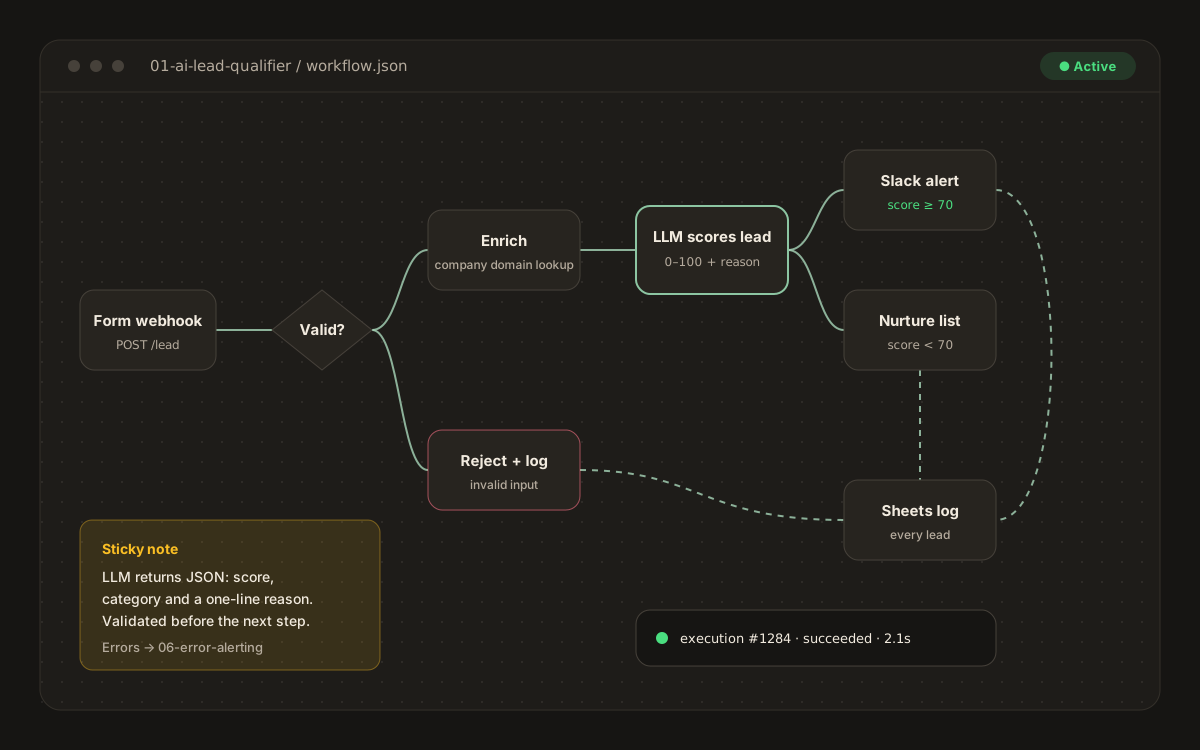
- Form webhook
- Validatereject + log if invalid
- Enrichcompany domain lookup
- LLM scores lead0 to 100 + reason
- Route≥ 70 → Slack, else nurture
- Google Sheets log
The LLM returns JSON with a score, a category and a one-line reason. That JSON is validated before the next step, so a bad model response never breaks the flow. Treating AI output like any other untrusted input is what makes an LLM step reliable enough to run unattended.
Rules every workflow follows
- Failures go to the global error workflow, so nothing fails silently.
- Webhook flows dedupe on an ID, because webhooks do get delivered more than once.
- Credentials are referenced by name and never exported, which is what makes the workflows safe to share.
- Sticky notes on each canvas explain its sections, and every folder has a README and a
sample-input.json.